Case Study · Enterprise SaaS

Journey Orchestrator: rebuilding the Program Builder

Program building was the heart of the product, and its biggest source of friction. I led the effort to reimagine it as an intuitive, AI-assisted workspace, owning research, stakeholder alignment, and design direction from discovery through launch.

My role
Design leadership, oversaw user research, design ideation and prototyping; managed UX teams; drove stakeholder communication and advocacy for user-centered practice.
Stakeholders aligned
  • Senior VP of Product
  • Head of Product Design
  • Product Managers
  • Engineering Manager
  • Director of Technical Communication
Focus areas
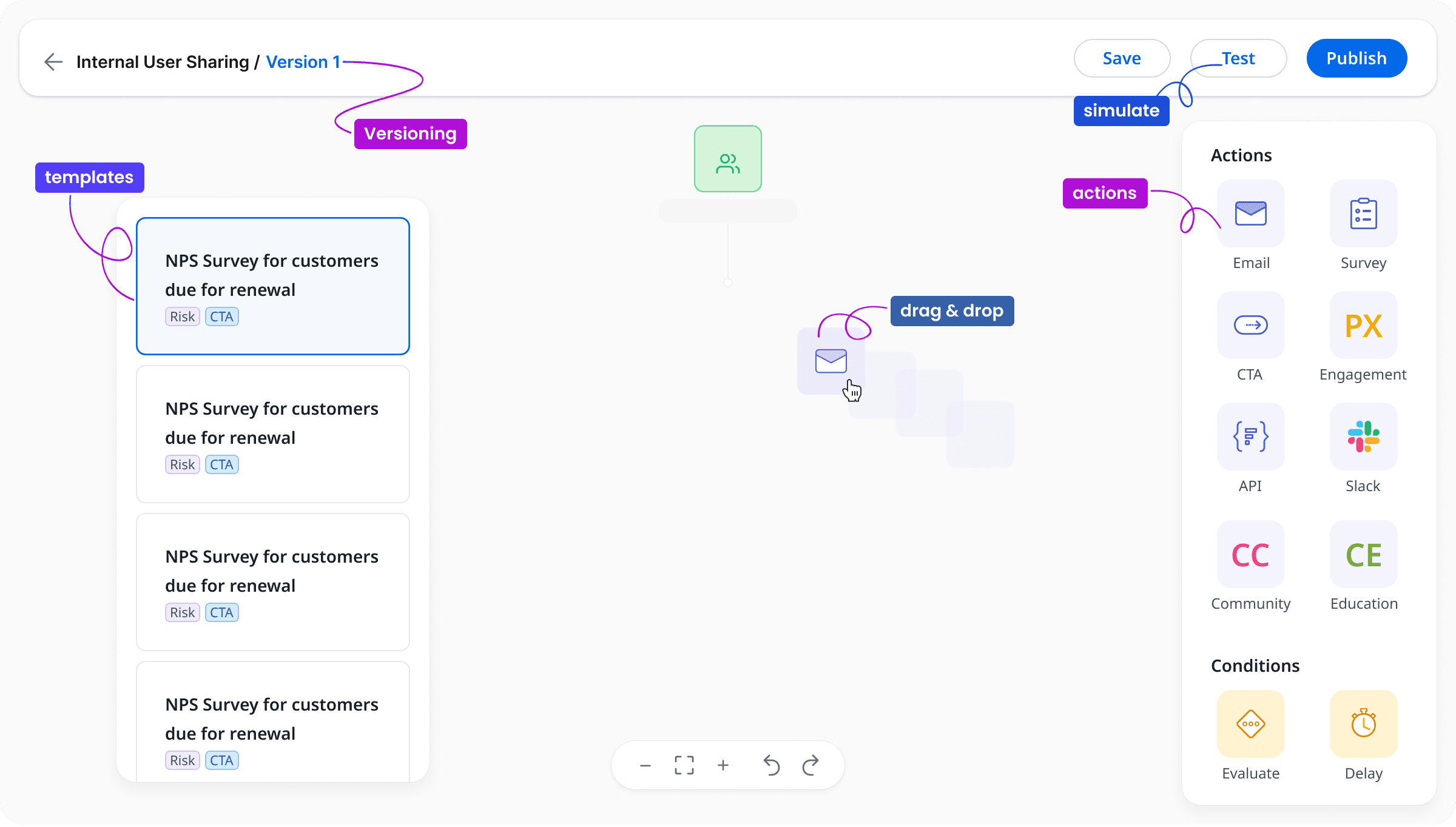
AI-native Drag & drop Versioning Testing Timezones Templates
The redesigned program builder showing an audience node connecting to an email node, which branches on 'opened' and 'not opened' into survey, delay, Slack and engagement steps, with an actions and conditions palette docked to the right.
The reimagined builder, drag-and-drop authoring with branching logic, conditions and a full action palette.
The challenge

Program building is complex, and the tool made it harder

Building a program isn't a single task. It combines logical structuring, technical detail, and cross-team collaboration. The existing builder was rigid, forcing users to adapt to the tool rather than the other way around.

Left unaddressed, that rigidity carried real organizational cost: programs failed silently, admins cloned and republished just to “test,” and teams stood up duplicate programs simply to handle different timezones.

The goal

An intuitive workspace that simplifies complexity

I framed a clear target: reimagine the Program Builder around the user's mental model, with drag-and-drop nodes, AI-powered inline source creation, versioning, testing, dynamic participant timezones, and reusable templates.

Drag-and-drop nodes AI inline sources Versioning Testing Dynamic timezone Reusable templates
Research & discovery

From research to launch, decisions were earned, not assumed

I designed a mixed-method research program, secondary research, working sessions, community feedback and testing, and used real-time insight to fine-tune the final experience.

0min
Per working session
7+2
7 admins & 2 execs
0
Guided questions
3
Segments: Enterprise, SMB, Tech-touch

Five pain points that made building hard

Secondary research surfaced the structural reasons program building broke down for real teams.

Complex logic structures

Users struggled to translate abstract goals into executable workflows without errors.

Rigid workflows

The builder lacked flexibility, making even small changes tedious.

Collaboration gaps

Teams working across time zones faced constant friction in communication and alignment.

Error-prone environment

Without strong validation, versioning or testing, mistakes were common and costly.

Steep learning curve

Non-technical users found the existing builder intimidating and inaccessible.

Collaborative ideation

I ran working sessions with mid-market and enterprise admins to ground every decision in their reality.

A collaborative affinity board of color-coded sticky notes organized into three columns: JO Templates, High-level Workflow Suggestions, and Other Feedback.
Synthesizing working-session input into themes, templates, workflow suggestions, and broader feedback.
Prioritization

Turning admin voices into a vote-ranked roadmap

Rather than designing to opinion, I converted qualitative feedback into an evidence-backed priority model, each opportunity carried by admins' own words and a clear vote count.

Working Sessions with Admins

Design process

From prioritized signal to validated design

A deliberate path from divergent ideation to convergent, tested decisions.

  1. Brainstorming & feature prioritization

    Mapped the problem space and ranked opportunities by admin votes and business impact.

  2. User flow

    Defined the lifecycle, draft, test, active, edit, version and discard, so the model matched how teams actually work.

  3. Exploration & iterations

    Pressure-tested concepts against real workflows, iterating quickly on the riskiest interactions.

  4. Evolving audience setup

    Reworked how participants are sourced and managed, reducing the need to rebuild queries.

  5. Streamlining outcomes

    Consolidated analytics and management so admins could combine programs and see results in one place.

  6. Final designs based on user feedback

    Carefully refined to meet what customers actually wanted, making the experience easier and more powerful.

A program lifecycle flow diagram: Program List to Draft Program, a decision point to Test Program, then Active Program with edit, pause and stop options leading to a working draft that can be published or discarded.
The program lifecycle, designing the states and transitions before designing screens.
The solution

Final designs built around what customers needed

Each capability targets a specific, vote-ranked pain, making program building easier and more powerful for administrators.

// Templates

Reusable templates

Customizable templates for diverse use cases, quick setup without compromising personalization.

// Authoring

Drag & drop

Build and adjust programs on a drag-and-drop canvas, designed for all users and responsive across devices.

// AI-native

AI inline source creation

Create a participant source seamlessly with AI, without leaving the workspace or rebuilding queries.

// Reliability

Versioning

Save and track versions of a program, experiment with changes, and collaborate on active versions safely.

// Reliability

Real-time error handling

Detect and highlight issues as they happen, helping users identify and correct problems before launch.

// Global

Dynamic participant timezone

Automatically adjust communication timing to each participant's time zone for seamless global scheduling.

The Select Program Templates screen with a searchable list of templates, Low Adoption, Onboarding, NPS, CSAT, and a preview of the chosen template's audience-to-email branching flow.
Reusable templates, quick, personalized starting points.
The drag-and-drop builder canvas with branching nodes and an actions and conditions palette.
Drag-and-drop authoring with branching logic and conditions.
Outcomes

Revolutionized program building, and the numbers showed it

Templates, AI sourcing, drag-and-drop, versioning, testing and dynamic timezones came together into a single, measurable shift.

0%
Program setup time
Faster, simpler builds
+0%
User satisfaction
A more positive experience
+0%
Adoption & engagement
Measured post-launch
0%
Technical issues & tickets
Higher reliability
An internal note observing that customers with at least one active Journey Orchestrator grew sharply, with a line chart of active-JO tenants rising steeply through 2024.
Adoption signal

The release of dynamic programs at the end of 2023 was the primary driver behind a sharp acceleration in adoption, doubling monthly customer growth from 2% to 4% in 2024.

A clear line from the design strategy, dynamic, timezone-aware programs, to a business outcome leadership could see in the data.

What we shipped

  • Templates that make overall program building simple and fast
  • Advanced AI to create a source seamlessly without leaving the workspace
  • Drag-and-drop nodes right on screen
  • Versioning to track changes and experiment with configurations
  • Testing that keeps programs robust and error-free
  • Dynamic participant timezone for communications that send at the right local time
From frustration to flow

One workspace, one source of truth

After the improvements, admins could effortlessly combine programs and view all analytics in one place, instead of standing up multiple programs and stitching results together. The result was real time saved and a meaningful boost in efficiency.

Ideating next

Testing with dummy data A/B testing Move participants between versions, manually or by criteria

Want this depth of leadership on your team?

From discovery to measurable outcomes, I lead design that moves the business.

Get in touch